Pure Power Picks Review: We Tested It — Is It Legit and Worth $97?
A trade-alert service built mostly around options, with a stock side, a trade planner, an AI assistant and a live tracker attached. We logged in, worked through every section, and checked what the company publishes about itself. Here’s what it does well, what to watch, and whether it’s worth $97 a month.

Most trade-alert services hand you a ticker and a hope. Pure Power Picks (PPP) tries to hand you the whole file: a written thesis, a marked chart, the options contract, the levels that would prove the idea wrong, and a live tracker that keeps following the alert after the notification is gone.
This isn’t a sales-page rewrite. We spent time inside the platform, start to finish, and went through the alerts, the tracker and its analytics, the weekly watchlist, the trade planner, the charts, the AI assistant and the market scanners, and we read the company’s pricing, terms and published results. Below is what we found, including the part most readers care about: whether Pure Power Picks is legit, and whether it’s worth the money.
In This Review
Our Verdict
Pure Power Picks is a real, openly operated alert service with a better tool set than most of its competition. The alerts come with their reasoning and their invalidation level written out, the tracker shows every alert including the ones that failed, and the planner, charts, assistant and scanners are genuinely useful in their own right. After testing it, our view is that it’s legit in the sense that matters: it does what it says, it’s open about its limits, and we didn’t find anything that looked like a scam.
What it isn’t is a shortcut to profit. Options alerts are high-risk by nature, and the headline numbers PPP publishes measure the best price a contract reached after an alert, not what a member would have made. When we looked at the live tracker, 55% of active alerts had hit a +50% high at some point, yet only 39% were green at that moment and ten of the 38 had been invalidated. That’s a mixed, honest picture, and it’s the right way to read the product: a well-organised research and tracking system for options traders, not a money machine.

Best for options traders who want researched alerts, a tracker and planning tools in one place.
Visit Pure Power Picks → Start 7-Day Free TrialOptions trading involves significant risk and isn’t suitable for every investor; you can lose the entire premium. PPP provides educational alerts, not personal advice. Past tracked results don’t predict future results.
What Is Pure Power Picks?
Pure Power Picks is a subscription service that publishes researched stock and options trade alerts, plus a set of tools wrapped around them. According to its own About page it has been publishing since early 2020, and it describes its approach as fewer alerts with the thinking written out: three to five a week rather than a stream of daily picks.
PPP calls the whole package the “Alert Intelligence System.” In practice that means one account that gets you the alerts, a weekly watchlist, a live tracker that follows every alert, a trade planner, a chart workspace, an AI assistant, market scanners and a Discord trading room. The company says plainly that it is not a registered investment adviser and that nothing it publishes is a recommendation to buy or sell. We come back to what that means for you in the legitimacy section.
One point worth settling early: is this only for options? Mostly, yes. The flagship alert is built around a stock setup with an options contract layered on top for members who want the leverage, and the tracker’s default view is the options list. But the alerts start with a read on the underlying stock, there is a separate Stock view in the tracker, and the watchlist, planner and charts all work on shares. So if you trade shares and want researched levels, you can use it that way; if you trade options, you’ll get the most out of it.
What You Get With Pure Power Picks
Every plan includes the same features; the only thing that changes between monthly, quarterly, yearly and lifetime is how you pay. After going through the account, these are the pieces that matter:
- 3–5 trade alerts a week — each with a written thesis, the matching options contract, marked chart, targets and an invalidation level
- Delivery by app push, text, email and Discord — you choose the channels
- Alert tracker — every alert followed live, with plan status and a contract health score
- PPP Watchlist and weekly brief — a Sunday board of names with levels and an earnings calendar
- Trade Planner and AI Assistant (My Desk) — both draw on a shared allowance of AI credits
- Charts and Data Flow — a chart workspace plus four market scanners
- Trading Room on Discord — a community that PPP says is open around the clock
- iPhone and Android apps — included with membership
PPP also publishes free tools on its site, including options profit and covered-call calculators, a wheel-strategy calculator and trading journal templates, and a free options ebook for account holders. Those are useful for learning the basics before you pay for anything.
Inside the Platform, Section by Section
The part of PPP you live in is the web tracker; the mobile apps are built on the same system. On desktop it opens on the alerts, with a left-hand menu running through PPP Alerts, PPP Watchlist and Chart Tracker, then My Desk, Trade Planner, Charts, Data Flow and Notifications, with an Assistant button in the top bar. We went through them in turn. The screenshots below are from our own session.
PPP Alerts and the alert page
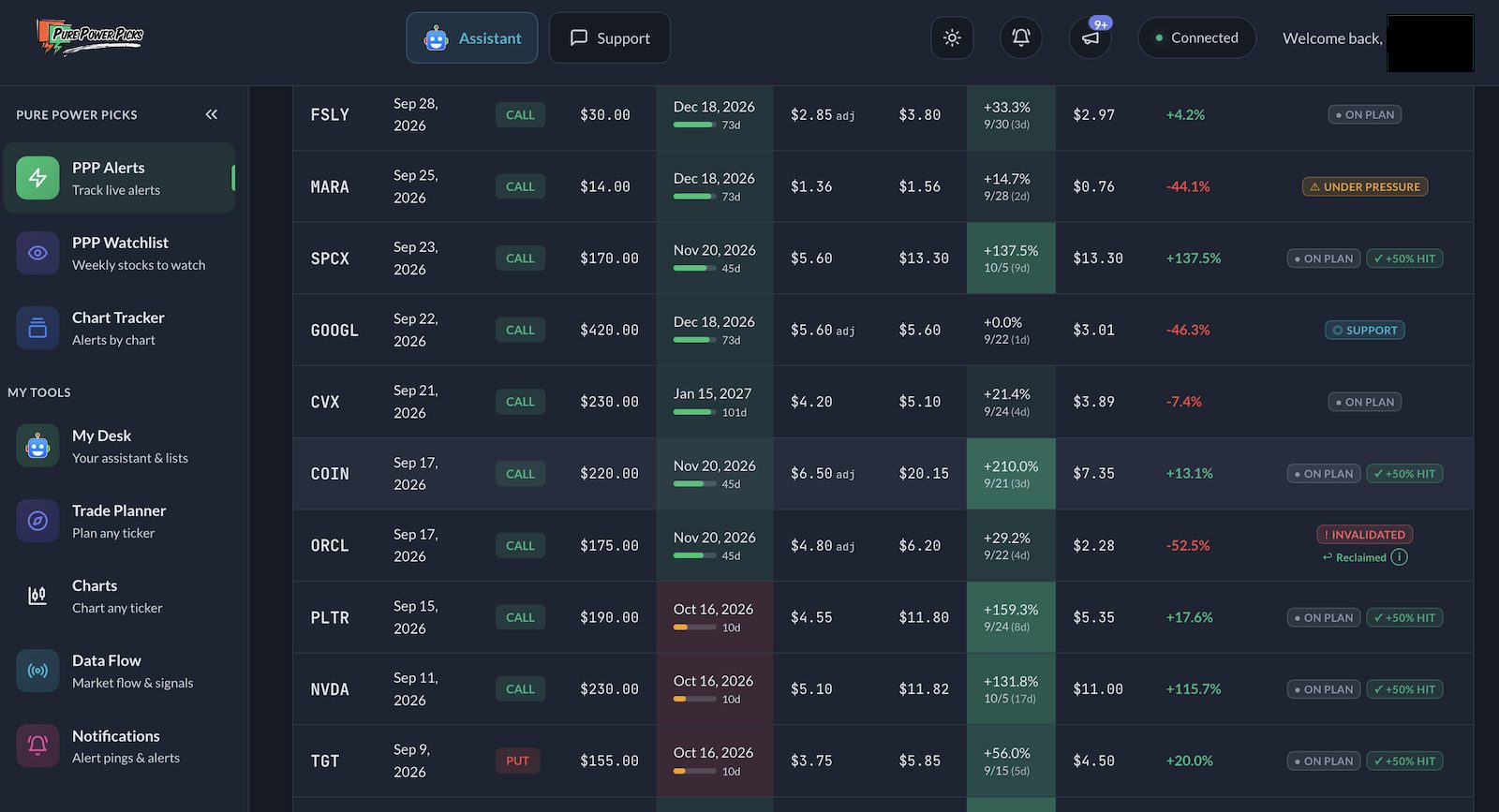
The Alerts screen is a table of every option alert (a card-style “Classic view” is also available), with toggles between Active and Expired and between Options and Stock, plus filters for ticker, type, status and date. Each row shows the ticker, call or put, strike and expiry, the price the contract was alerted at, its recorded high and when it hit, the current price and percentage move, a plan status, and a “Contract Health” score. When we looked in early October there were 37 active option alerts.
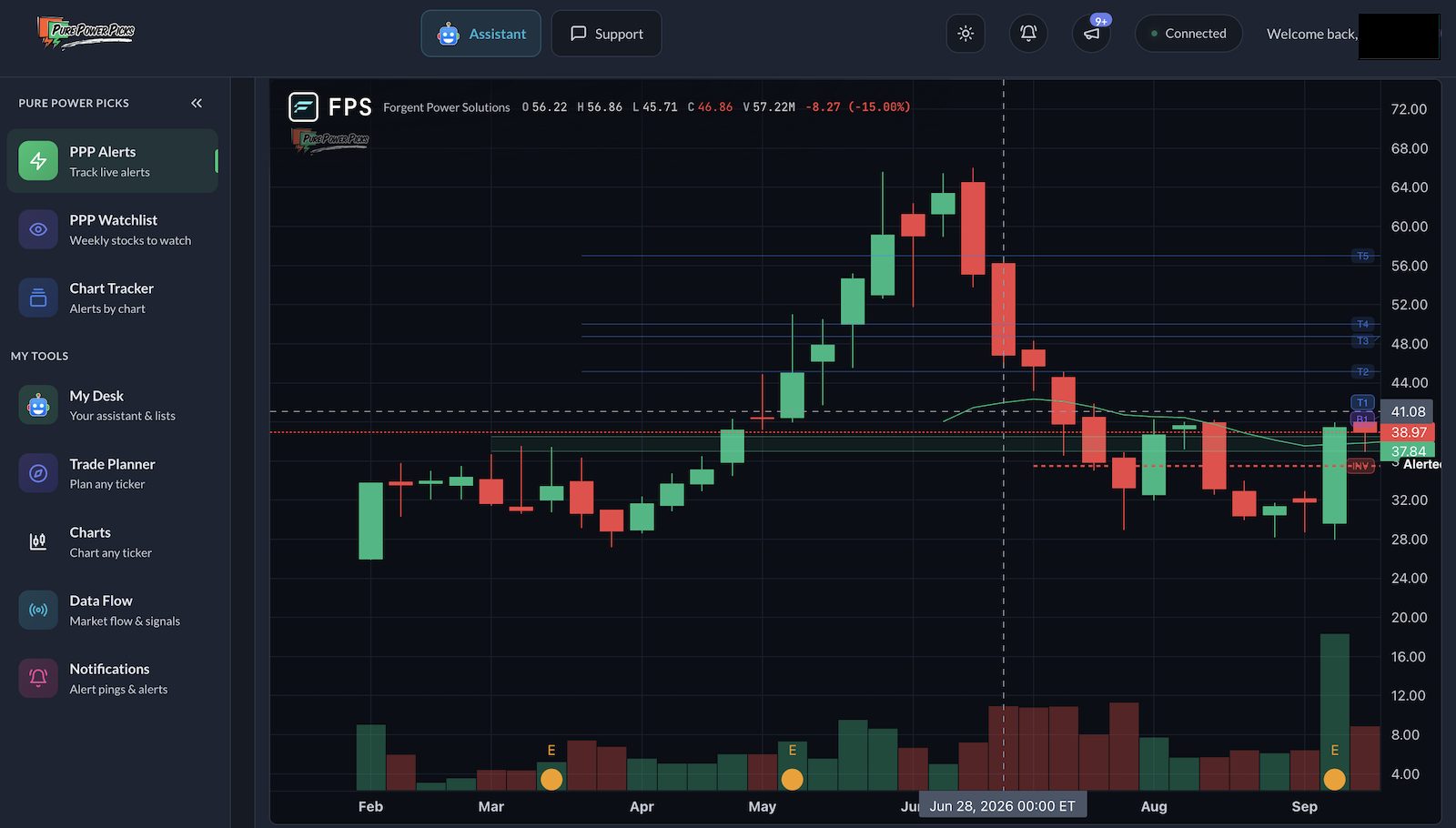
Opening an alert is where PPP earns its keep. Each alert has its own page that puts the whole trade in one place. The top shows how the stock has moved since the alert, the level where the idea is considered wrong, how many price targets have been reached, and how the option contract itself is doing, with a health score for the contract. Below that, the page explains the thinking behind the alert in writing and draws the key levels on a chart, so you can see where the trade is meant to work and where it is meant to fail. You can also save the alert to My Alerts to keep track of it.
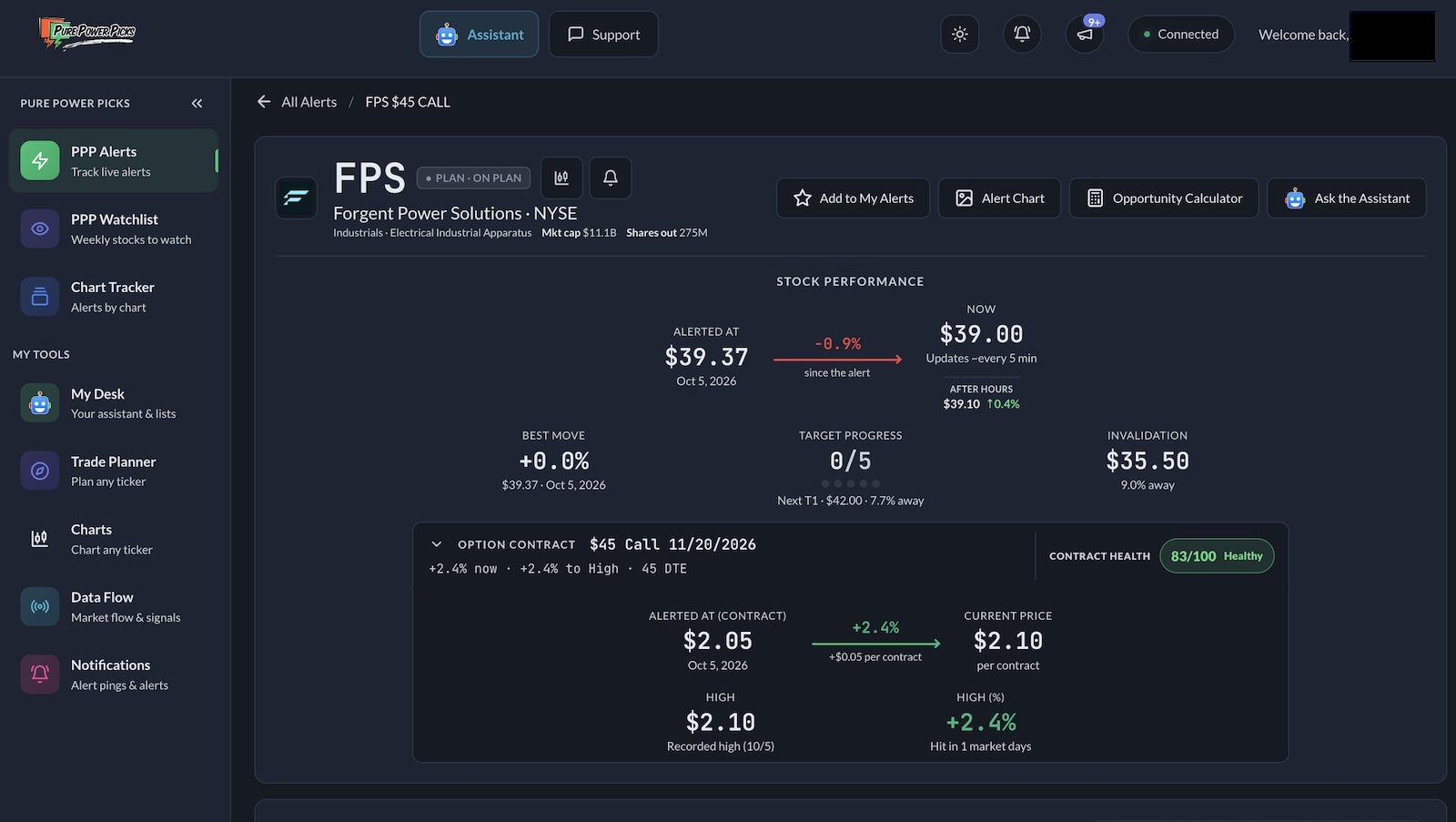
What stands out is how much of the trade is defined before you place it. The entry price, the point where the idea is wrong and the targets are all set out in advance, so you can see at a glance whether the idea is working and how the contract is behaving. The chart below draws the same levels on price.
Alert tracker and analytics
The tracker is the feature that separates PPP from a plain signals channel. Above the alert table, an Analytics & Insights panel summarises the active alerts: the share that have recorded a +50% high, the share that are green right now, the best and worst performers over a chosen window, and a breakdown by plan state. When we opened it in early October, 55% of active alerts had recorded a +50% high and 39% were green. The plan-state breakdown showed 23 alerts on plan, one in a support zone, four under pressure and ten invalidated.
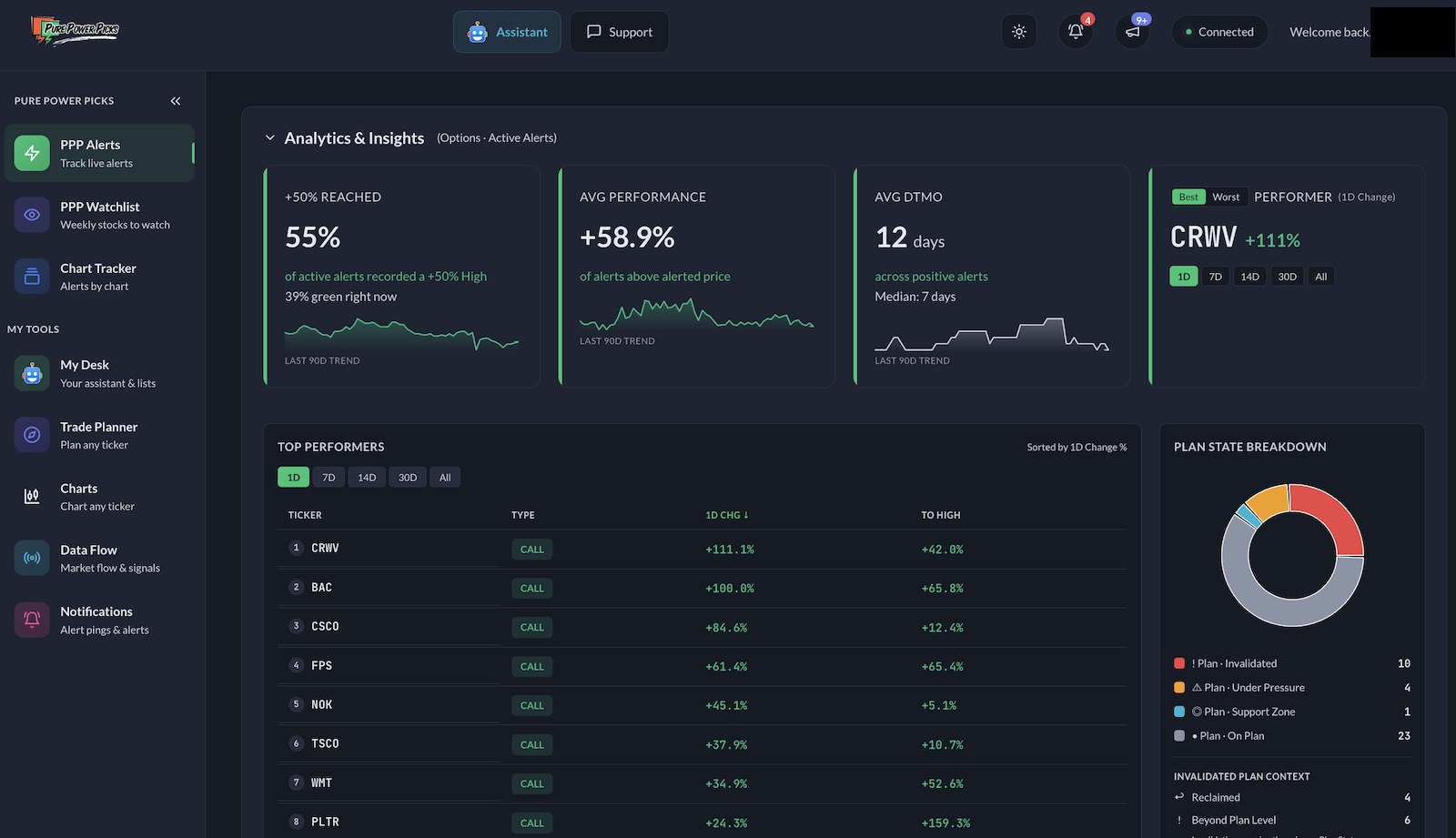
We like that the tracker puts those two figures next to each other. It makes the difference between “reached a high” and “is up now” impossible to miss, and it’s the same distinction we ask you to keep in mind in the track record section below.
Chart Tracker
Chart Tracker turns the same list into a board of charts: every alert gets its own chart, so you can scan the whole set visually instead of reading rows. You can switch between the stock’s price and the option contract’s price, search by ticker, sort the board, and filter by active or expired, calls or puts, your starred alerts, and alerts that have delivered +50%. Each tile shows the alert date, total move, the high and how many days it took, the alerted and current contract price, and the plan status.
PPP Watchlist and the weekly brief
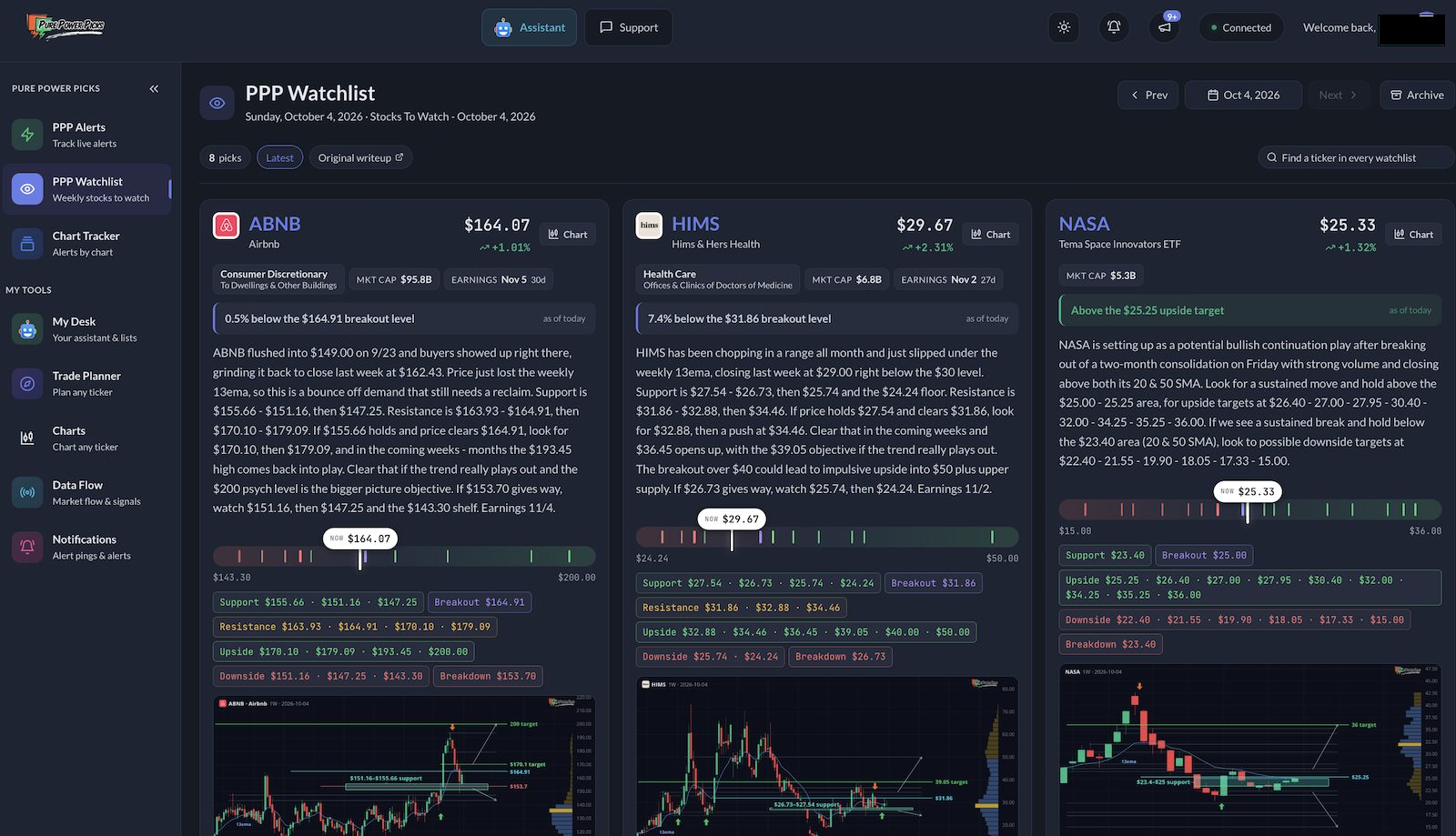
Each Sunday PPP publishes a weekly market brief and a watchlist of names it’s following, which then lives in the tracker. The board we saw, dated October 4, had eight picks, including ABNB, HIMS and a space-themed ETF (NASA). Every card carries a written thesis, live price, support and resistance, breakout and breakdown levels, upside and downside targets, the next earnings date and a marked chart, with a link to the original write-up and an archive of earlier weeks.
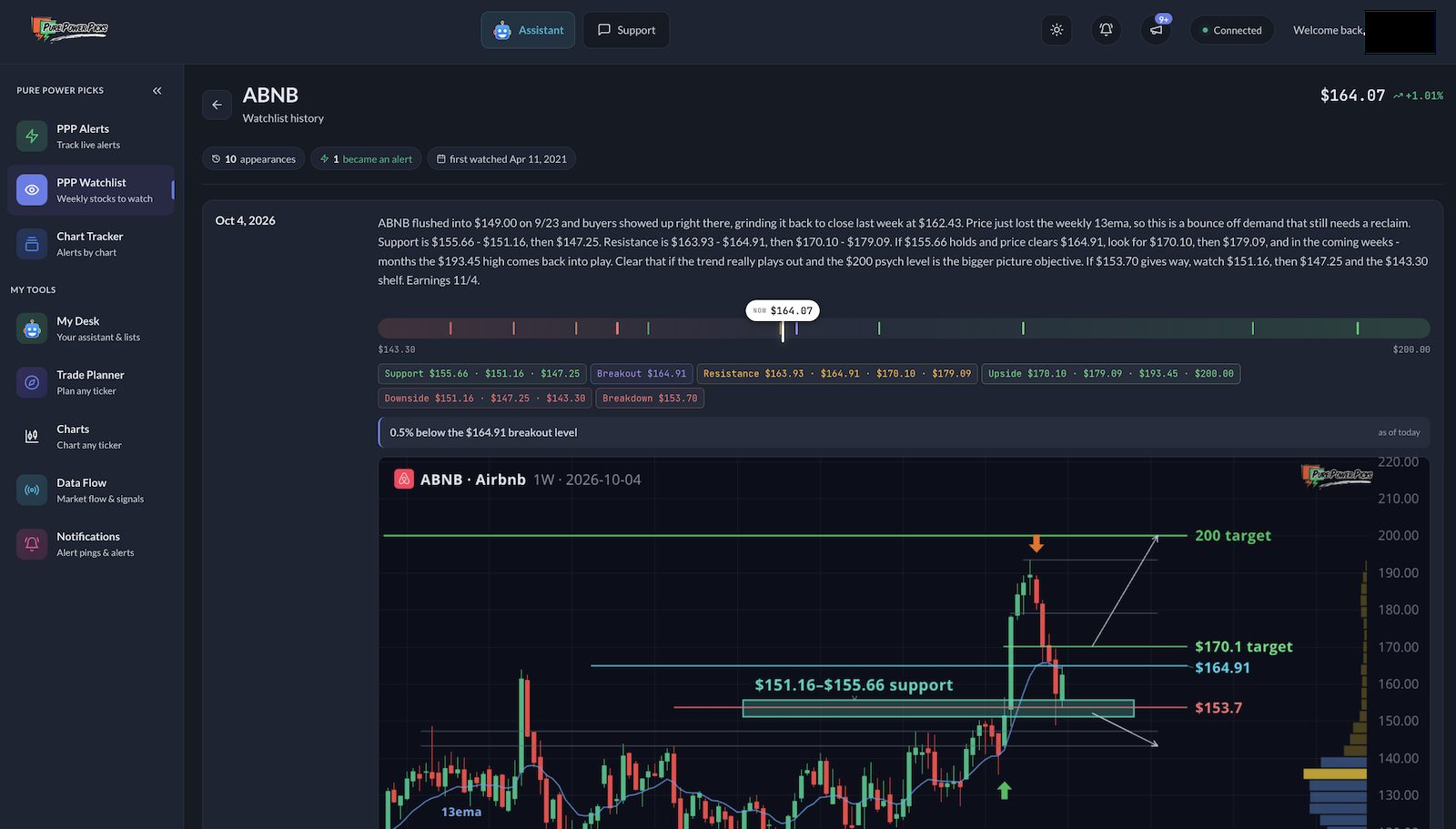
Tapping a name opens its watchlist history, which is a nice piece of record-keeping. ABNB’s page showed ten appearances on the weekly list since April 2021, one of which had become an alert. PPP says watchlist names that later become alerts are flagged, so you can see how often the board turns into a trade idea.
Trade Planner
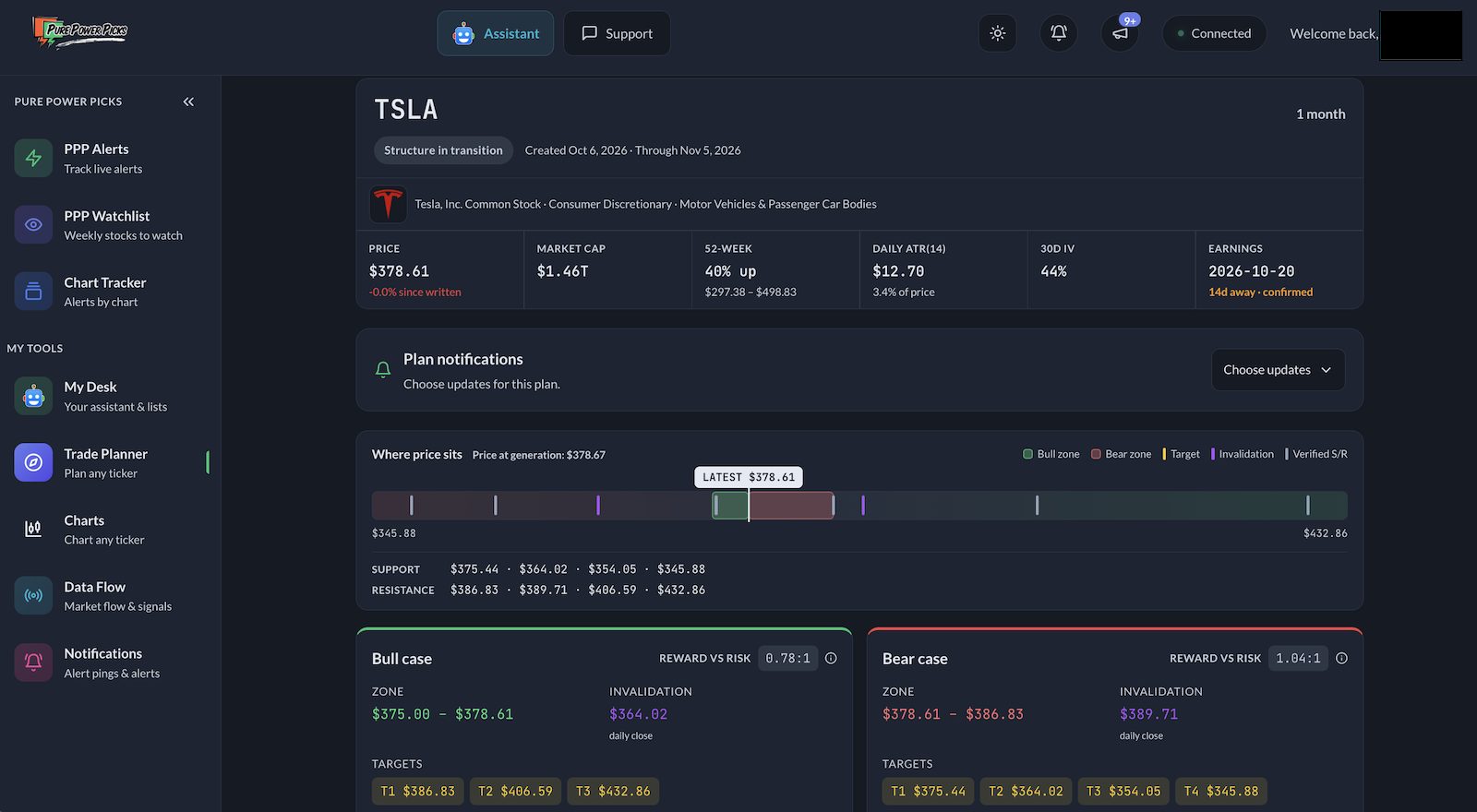
The Planner is the tool we’d single out. You type a ticker, pick a horizon from two weeks to twelve months, and it builds an educational map of the stock’s structure. We ran TSLA on a one-month horizon, and it labelled the structure “in transition.” It returned a bull case and a bear case side by side, each with a price zone, targets and an invalidation level on a daily close, plus a reward-to-risk figure for each, and a bar showing where price sits against support and resistance. It then lists real option contracts at those levels, with expiry, strike, delta, open interest, volume and a liquidity grade.
What impressed us is that it doesn’t push a direction. For TSLA the two sides were close to even on reward-to-risk (0.78:1 bullish, 1.04:1 bearish), which is what you’d expect from a stock sitting between levels. When we ran NVDA, the bull case came out at 0.53:1 against 10.48:1 for the bear case, a sign the stock was just under resistance with little room above it. PPP is also clear that the Planner is not a recreation of its published alerts: levels and contracts may differ from a human-reviewed alert. Each plan uses part of your AI credit allowance, and the plans you generate are kept under Saved plans so you can go back to them.
Charts
Charts is a full chart workspace inside the tracker. We loaded SPY and found timeframes from one minute to monthly, moving averages, volume, and a toolbar for studies, drawing and layouts. According to PPP, the toolkit also includes RSI, MACD, VWAP, a volume profile, trend lines, Fibonacci retracements and saved layouts, and you can copy a published plan into TradingView. It won’t replace a dedicated charting platform for heavy users, but having the chart next to the alert and the watchlist saves a lot of tab switching.
My Desk and the AI Assistant
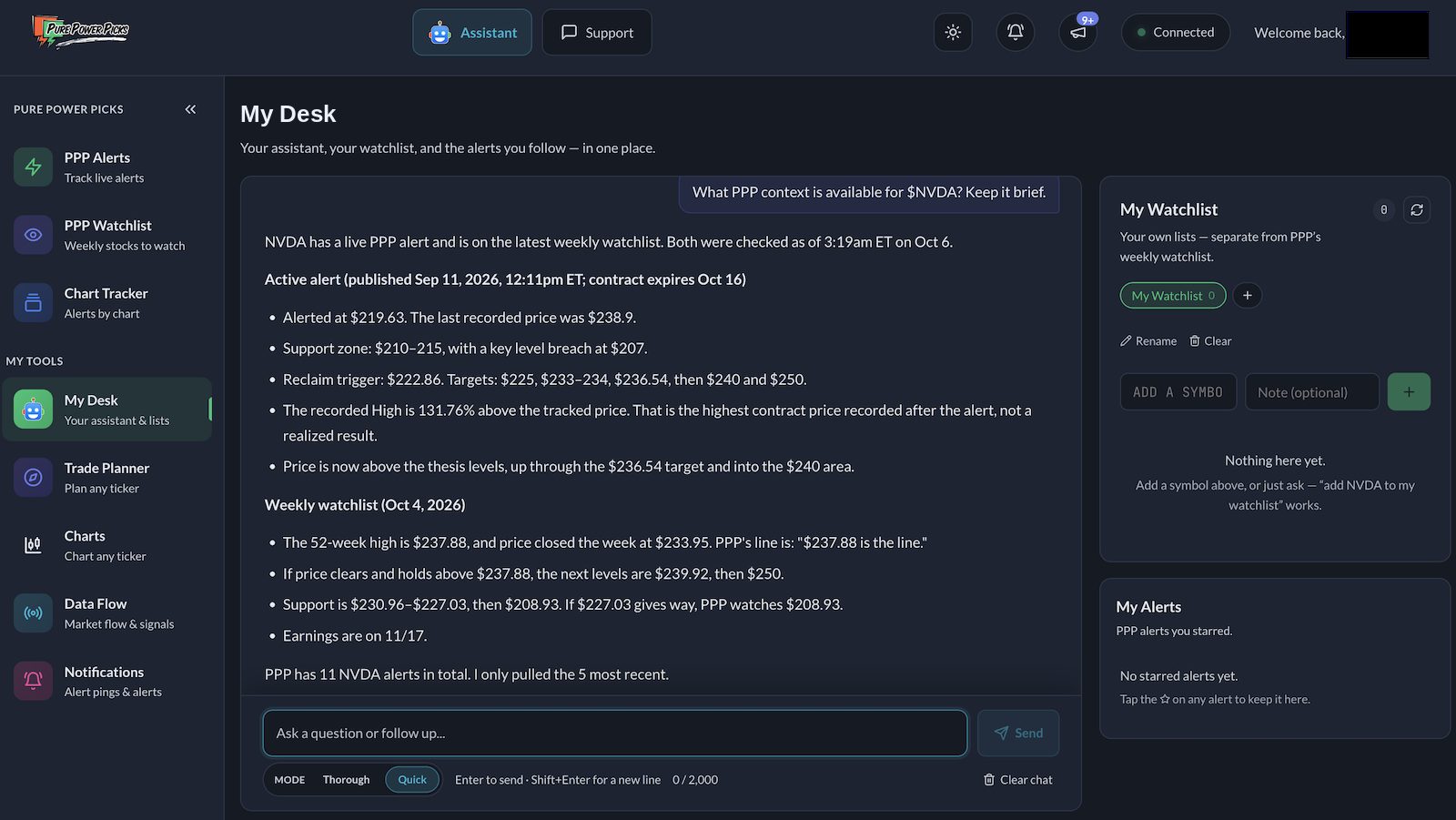
My Desk is the assistant: a chat plus your own watchlist and the alerts you’ve starred, available as a full page or as a panel from the Assistant button in the top bar. You choose a Quick or Thorough mode, and the Planner and the assistant share the AI credit allowance, with a credit meter in the account menu showing how much you have left. We asked it two questions. First, how PPP suggests planning stops and taking profits. The answer was candid: PPP doesn’t hand out stop orders or exit instructions, its “invalidation” is a daily close beyond a level rather than a guaranteed stop, a stock can gap past it, and the recorded high on an alert is not a realised exit. Second, what PPP context exists for NVDA. It pulled the live alert (alerted price, support zone, reclaim trigger, targets, the recorded high) and the weekly watchlist notes, and said it had only pulled the five most recent of eleven NVDA alerts.
Both answers were accurate against what we’d seen in the tracker, and both repeated the educational disclaimer. For a newer options trader, an assistant that explains the how and the why, and keeps pointing back to the real published levels, is a real plus.
Data Flow
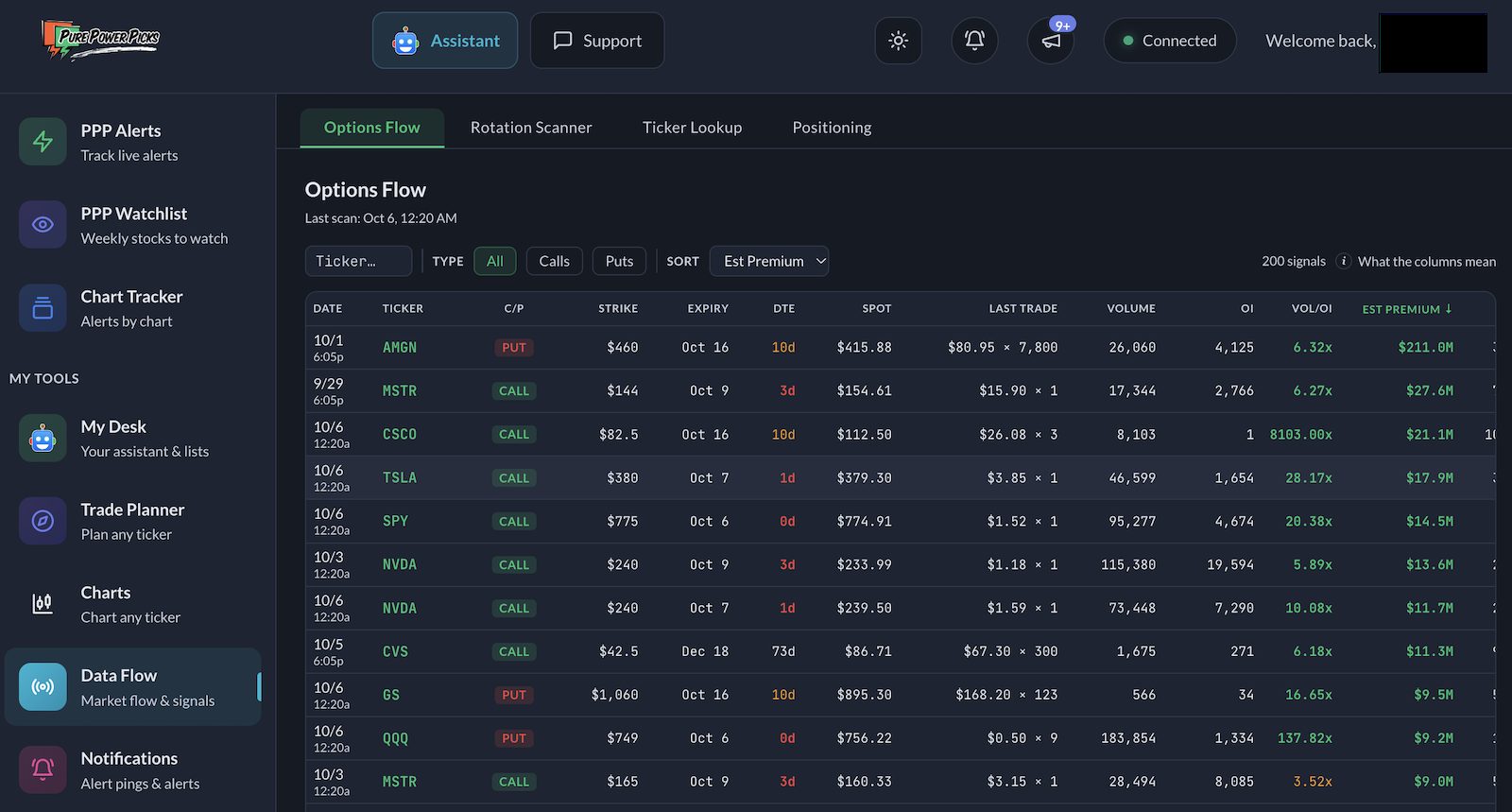
Flow is PPP’s scanner section, with four views: Options Flow, a Rotation Scanner, Ticker Lookup and Positioning. Options Flow lists unusually active contracts (200 signals at the last scan on October 6), sortable by estimated premium, volume against open interest, implied volatility and days to expiry, with a guide to what each column means. The Rotation Scanner scores sectors and stocks as rotating in or out using RSI, money-flow and relative-strength readings. These are data tools, not recommendations, and they’re only as useful as your ability to read flow data. One caveat: the Positioning view was still loading and showed no data when we checked, so we can’t vouch for it yet.
Notifications, apps, SMS and Discord
Alerts reach you through whichever channels you switch on. Our account had SMS opted in and Discord connected from the dashboard, and the tracker keeps a log of each notification against its alert (the FPS page, for instance, recorded “New alert: FPS $45C 11/20” with its time). PPP says the mobile apps send pushes for new alerts, contract target milestones, invalidation updates and new watchlists, and that the apps are on the App Store and Google Play. PPP also says its Discord Trading Room runs around the clock, with a stream of automated scanner alerts on top of the curated weekly ideas.
Does It Work? The Track Record, Read Properly
This is the section to read slowly, because it’s where the marketing and the reality of any alert service pull apart. PPP publishes a lot of numbers. The most important thing to understand about them is how they’re calculated.
PPP’s headline metric is “Max Opp” (maximum opportunity): the highest price an options contract reached after the alert, compared with the price it was alerted at. It is a measure of the best the contract ever looked, calculated without a stop-loss and without regard to when, or whether, anyone could have sold at that peak. PPP says this itself: the figures are “tracked alert setups, not actual trades taken,” and its results page states that its dataset records peak opportunity rather than the full price path, so it doesn’t show interim drawdowns, practical exits or realised returns. We agree with that framing, and it’s why we can’t tell you what a member would have earned.
PPP’s published archive covers 781 alerts from May 2021 to December 2025. It reports an average max opportunity of 190.8%, with 62.7% of alerts reaching +50% at some point and 19% peaking below +20%. These are PPP’s own, self-reported peak figures, we haven’t independently verified them, and PPP says results after December 2025 aren’t included.
Two things stand out. First, PPP does publish its misses: the results page has a section on low performers, lists the 22 alerts that never traded above their alert price, and notes that the share peaking under 20% fell from 18.7% in 2022 to 13.7% in 2025. That openness is worth something. Second, the live tracker shows why peak numbers need care. When we looked, 55% of the 38 active alerts had recorded a +50% high, but only 39% were green, and some alerts from August had lost most of their value: the CRWV call was down 98% and the CSCO call down about 88%, both marked invalidated.
One more hands-on check: the “live from the tracker” ticker on PPP’s pricing page quotes figures such as BABA +27%, SPCX +138% and INTC +321%. Those matched the “to high” figures we saw for the same alerts inside our account, so the public numbers do come from the real tracker rather than a separate marketing sheet. That tells you the figures are consistent, not that they translate into returns.
In conclusion, yes: we can confirm that the PPP alert system can provide valuable trade alerts, and the tracker is open about the ones that didn’t work out as well as the ones that did. But at the end of the day, it’s also up to you to pick the right alerts and manage them well. That is what PPP does: it gives you alerts, and no alert service can be 100% accurate.
A contract that doubles and then fades back to zero still counts as a “+100% hit” in Max Opp. Use the numbers to judge how often PPP’s setups move, not to estimate what you’d make. Whether you profit depends on your entry, your exit and your position size.
Is Pure Power Picks Legit?
This is the question most people searching for the service are really asking, so here is a direct answer. In our assessment, Pure Power Picks is a legitimate, operating business and not a scam. It sells what it says it sells, it delivers it, and it’s unusually open about the limits of its own numbers. “Legit” is not the same as “profitable,” though, and nobody can promise you the second.
- A named company. PPP’s footer reads “Pure Power Picks, A HappyAlien LLC Company,” and its terms are governed by California law.
- The product exists and works. We logged in and used every section; alerts, tracker, planner, charts, assistant and scanners all loaded with live data.
- Clear disclosures. PPP states it is not a registered investment adviser or broker-dealer, that its alerts are educational, and that results are tracked setups rather than trades taken.
- A public record that includes losses. The archive, the live tracker and the “misses” section show failed and invalidated alerts rather than hiding them.
- Consistent numbers. The figures advertised on the pricing page matched the tracker inside the account.
- A real review profile. PPP’s claimed Trustpilot page shows a strong rating, and the company replies to negative reviews.
Now the part that keeps this from a blanket endorsement. We couldn’t verify any member’s real-world returns, and PPP’s own archive is self-reported. The About page doesn’t name the founders or team, so we can’t tell you who is behind the service. The company is not a registered investment adviser (it says so openly, and it’s common for alert services to be set up as education), which means you don’t get the regulatory protections that come with an advised account. And the terms say all sales are final, which matters if you sign up for a long plan. None of those are signs of fraud, but they’re the things to weigh before paying.
Our advice is the one we’d give for any trading service: treat reviews, including ours, as a starting point, use the free trial to judge it yourself, and don’t trade size you can’t afford to lose on someone else’s idea.
What Traders Say About Pure Power Picks
Most public feedback sits on Trustpilot. Members also talk in PPP’s own Discord, which is for members, so we can’t quote or measure it. When we searched for independent discussion on Reddit and public trading forums, we found little we could use, so there’s no large outside thread to draw conclusions from. That cuts both ways: less outside scrutiny, good or bad, and Trustpilot becomes the main public evidence. The recent reviews we read were marked as unprompted rather than invited by the company, and PPP says it replies to its negative ones.
Trustpilot reviews
Generally, the reviews on Trustpilot are very positive: PPP holds 4.5 out of 5 across 40 reviews, and 80% of them are five-star.
Trustpilot figures as of October 2026; scores change over time. A small share of reviews are one or two stars.
What reviewers praise and criticise
What members praise. Praise clusters around a few themes: the research behind each pick, the small number of ideas each week (several reviewers contrast it with services that send a flood), the fact that every alert is posted and tracked, an active Discord, quick customer service and the weekly “Stocks to Watch” write-ups. Several reviewers say the 7-day trial convinced them, and a number describe the service as helping them understand why a trade works instead of only telling them what to buy.
What they criticise. Complaints are fewer and mostly practical. One member said they were removed from the platform after cancelling a quarterly plan and were still charged for the next quarter; PPP replied that a bug had cut their access, that it had been restored, and apologised. Others said it’s hard to act on alerts quickly enough around a job, asked for more alerts per week, or wanted to copy a write-up into their broker platform more easily. In the reviews we read, none questioned the research itself.
How much weight to give it. Treat the returns in these reviews carefully. Some members cite win rates of 90–95% or say a single pick paid for their subscription. We can’t verify that, and it sits oddly beside PPP’s own tracker, where 39% of active alerts were green when we looked (55% had touched a +50% high at some point). Those reviewers may be describing peak prices or their own best trades. Trustpilot doesn’t fact-check reviews, so we’d use them for themes such as research quality, support and billing, and not as evidence of returns.
Pricing and Is It Worth It?
PPP sells one membership with every feature included, and you choose how to pay for it. The monthly plan comes with a 7-day free trial: $0 today, then $97 a month from day 8 unless you cancel from your dashboard.
| Plan | Price | Works out to |
|---|---|---|
| Monthly (7-day free trial) | $97 / month | $97 a month |
| Quarterly | $247 / 3 months | About $82 a month |
| Yearly | $797 / year | About $66 a month |
| Lifetime | $3,497 once | About 36 months of the monthly plan |
Prices from PPP’s pricing page, October 2026; they can change. Every term includes the same features. PPP defines “lifetime” as access for as long as it operates the service; if the service is discontinued, lifetime access ends without refund.
On pure cost, the yearly plan is the sensible one if you decide to stay: $797 against $1,164 for twelve monthly payments is a saving of about 31%. The lifetime price only makes sense if you’re confident you’ll use the service for several years, and the terms’ definition of lifetime is worth reading first.
So is it worth it? Break it into two questions. As a toolkit, $97 a month is reasonable. The alerts alone work out to roughly $4 to $7.50 each at three to five a week, and you also get a tracker, a planner, charts, an AI assistant and scanners that would otherwise be separate subscriptions. As a source of profit, nobody can say, and we won’t. The alerts we looked at were priced from under $1 to around $6.50 per share, which is roughly $50 to $650 per contract. If you trade small, the subscription is a large cost against your account before you’ve made a trade; if you trade larger, a single better-informed decision can outweigh it.
Our practical take: it’s worth it if you already trade options (or want to learn), you value researched levels and a record you can review, and you’ll actually use the tools. It’s probably not worth it if you’re expecting the alerts to pay for themselves, if you’re trading a very small account, or if you only want a few ideas a month. The free trial is the right way to find out.
The monthly plan includes a 7-day free trial, so you can work through the tracker and tools before the first charge.
Visit Pure Power Picks → Start 7-Day Free TrialOptions trading involves significant risk and isn’t suitable for every investor; you can lose the entire premium. PPP provides educational alerts, not personal advice. Past tracked results don’t predict future results.
Support and Our Experience With the Team
Support is one area where PPP stood out for us. When we had questions during testing, we contacted the team by email, and the replies were quick and detailed, with practical help rather than canned answers. We found that part of the experience quite impressive. The company’s support centre is also well stocked, with how-to articles on the Discord, text alerts, cancelling, receipts, changing a payment method and finding past alerts.
Outside reviews point the same way: Trustpilot reviewers describe responsive service, and the company replies publicly to negative reviews. For billing or cancellation questions, use the self-serve tools in your dashboard first and keep the confirmation emails.
Pros and Cons
- Every alert has a written thesis, marked chart, targets and invalidation
- Live tracker that keeps misses and invalidated alerts visible
- Trade Planner shows both bull and bear cases with real option contracts
- Charts, AI assistant and four scanners in the same account
- Three to five alerts a week, not a flood
- Delivery by app, text, email and Discord
- Responsive support in our experience
- One price covers every feature, with no add-on tiers
- 7-day free trial on the monthly plan
- Headline results are peak contract prices, not realised returns
- Options are high risk, and several recent alerts were invalidated
- Terms say all sales are final and subscriptions auto-renew
- Not a registered investment adviser
- Founders and team aren’t named on the About page
- The Positioning scanner was empty when we checked
- A tool for options traders; limited use if you only buy shares
Most of the weaknesses are about options risk and contract terms, which come with any alert service, while the strengths sit in the research, the transparency and the tools around the alerts.
In short: PPP is a well-built, transparent options research service with strong support. What you have to accept is that its headline numbers are peak prices and that options can lose money quickly. If you already trade options and want researched ideas with the levels attached, the 7-day trial lets you judge it before you pay. If you only buy shares or want passive income, it isn’t the right tool.
Who Is Pure Power Picks For?
It suits options traders who want a researched idea with its levels attached, swing traders who can act on a few setups a week, and people who are building their own process and want a tracker, planner and charts alongside the alerts. The educational tone, the glossary-style explanations and the assistant also make it approachable for someone newer to options, as long as they start small.
It’s not for anyone who wants guaranteed or passive income, day traders who need dozens of signals, people who only invest in shares or funds for the long term, or anyone who can’t afford to lose the money they put into trades. PPP’s own disclaimer says you could lose more than your initial investment, and we’d read that sentence twice before opening an options account.
How to Get Started
- Start the free trial. Pick the monthly plan to get the 7-day trial: $0 today, $97 from day 8 unless you cancel in your dashboard.
- Set up your channels. From the dashboard, connect Discord, opt in to text alerts if you want them, and install the app if you’ll use push notifications.
- Read before you act. Spend the first days opening alert pages, the weekly watchlist and the tracker’s analytics. Pay attention to the invalidation level on each alert.
- Try the tools on your own tickers. Run the Planner and the assistant on names you know, so you can judge how useful they are.
- Decide before day 8. If it isn’t for you, cancel from the dashboard before the trial ends. If you stay, you’ll also need a broker that supports options, such as the one in our Interactive Brokers review. PPP alerts aren’t tied to any one broker.
The Bottom Line
Pure Power Picks is a legitimate and well-built options alert service with a toolkit that goes well beyond the alerts. After testing it, what impressed us most was the transparency: every alert comes with its reasoning and its invalidation level, the tracker shows the misses, and even the AI assistant reminds you that a recorded high isn’t a realised gain. What holds the score back is that the headline numbers measure peaks, the terms are tight on refunds, and no alert service can promise a return. If you trade options and want research and tracking in one place, it’s worth the free trial. If you’re hoping it will make the money for you, it won’t.
Keep Reading
Other trading tools we’ve tested that readers often weigh alongside an alert service.
Frequently Asked Questions
Is Pure Power Picks legit?
In our assessment, yes. It’s an operating business (“A HappyAlien LLC Company”) that delivers what it advertises, publishes its alert record including losses, and states clearly that it is an educational service rather than a registered adviser. Legit doesn’t mean profitable: the published results measure peak contract prices, not what members earned. See our full legitimacy check.
Is Pure Power Picks a scam?
We found no sign of one. We tested the platform, it works as described, the public numbers match the tracker inside the account, and the company has a real Trustpilot profile and replies to complaints. The risks are the ordinary ones with options: you can lose money on any alert, and the terms say all sales are final.
What do traders say about Pure Power Picks?
Public feedback is mostly on Trustpilot, where PPP has 4.5 out of 5 from 40 reviews. Members praise the research, the small number of alerts, the transparency, the Discord and the customer service. Complaints are mainly about acting on alerts fast enough, wanting more of them, and one billing and access problem after a cancellation. We found little independent discussion on Reddit or public forums. See What Traders Say.
How much does Pure Power Picks cost?
$97 a month, $247 every three months, $797 a year, or $3,497 for lifetime access. Every plan includes the same features. The monthly plan has a 7-day free trial ($0 today, $97 from day 8). Prices can change, so check PPP’s pricing page. See pricing.
Is Pure Power Picks worth it?
As a toolkit for options traders, $97 a month is reasonable: researched alerts, a tracker, a planner, charts, an AI assistant and scanners. As a way to make money, no service can promise that. It’s most worthwhile if you already trade options and will use the tools; use the free trial to find out. See pricing and value.
Is Pure Power Picks only for options?
Mostly. The flagship product is options alerts, but each alert starts with a read on the underlying stock, and the tracker has a Stock view. The watchlist, planner and charts also work for people who trade shares.
How many alerts do you get?
Three to five curated alerts a week, each with a written thesis. The Discord room also carries an automated stream of scanner alerts throughout the day, but the weekly alerts are the core product.
Does Pure Power Picks have a free trial?
Yes. The monthly plan includes a 7-day free trial: $0 today and $97 a month from day 8 unless you cancel from your dashboard. PPP also advertises limited free access through its app and a free options ebook, so check what is currently offered.
Can I cancel Pure Power Picks, and is there a refund?
You can cancel yourself from your dashboard, and subscriptions auto-renew until you do. PPP’s terms say all sales are final, with refunds only in limited cases at its discretion, and its pricing FAQ mentions a 24-hour grace period after a charge. Cancel before a renewal date, not after it.
Is Pure Power Picks financial advice?
No. PPP says it is not a registered investment adviser, broker-dealer or financial planner, and that its alerts, planner and assistant are educational. Decisions and risk are yours.
How are Pure Power Picks’ results measured?
PPP tracks “Max Opp”: the highest price a contract reached after an alert compared with the alerted price, with no stop-loss assumed. These are tracked setups, not trades taken, and they don’t show drawdowns or realised returns. See the track record section.
Does Pure Power Picks have an app?
Yes, for iPhone and Android. PPP says push notifications cover new alerts, contract target milestones, invalidation updates and new watchlists. Our hands-on testing was on the web platform.
What is the AI Assistant, and are there limits?
The AI Assistant (My Desk) answers questions about stocks, PPP alerts and the watchlist using live data and PPP’s published levels. It and the Trade Planner share a usage allowance of AI credits, which you can check on the credit meter in the account menu. PPP can change allowances, so check the current limit.
Do I need a specific broker?
No. PPP alerts aren’t tied to a broker. You need an account that supports the options contracts you want to trade. See our Interactive Brokers review for one option.
Is Pure Power Picks good for beginners?
It can be, with care. Alerts are written in plain language, and PPP offers an options ebook, a crash course and an assistant that explains the reasoning. But options are high risk and can expire worthless, so beginners should start with small size or practice first.
This review is for informational purposes only and isn’t financial or investment advice. Pure Power Picks provides educational information and is not a registered investment adviser, broker-dealer or financial planner. Trading stocks and options involves a high degree of risk, you can lose your entire investment in a contract, and past tracked results do not indicate future results. Results quoted from Pure Power Picks are self-reported, describe tracked alert setups rather than trades taken, and have not been independently verified. Prices, features and ratings are as of October 2026 and can change; confirm current terms with Pure Power Picks before you subscribe. Pure Power Picks provided us with a member account for this review, and AllinAllSpace may receive compensation if you subscribe via links on this page.